tldr; This article will discuss important naming conventions used in the software engineering industry to keep code clean.
Some say coding is an art. However, unlike art forms such as painting, beauty is not in the eye of the beholder. We can write code that can be considered “ugly”. The problem is how do we figure out if we’ve just created a Van Gogh, or a first grade hand turkey. That’s the question I’m going to try to answer. I’m going to cover conventions and standards laid out over time by our forefather engineers that have stood the test of time. I know, as always, there might be some disagreement about these practices, but these are generally accepted and in my opinion should be followed.


Background
Personal Experience
tldr; It was at my first internship that I was even introduced to what clean code was
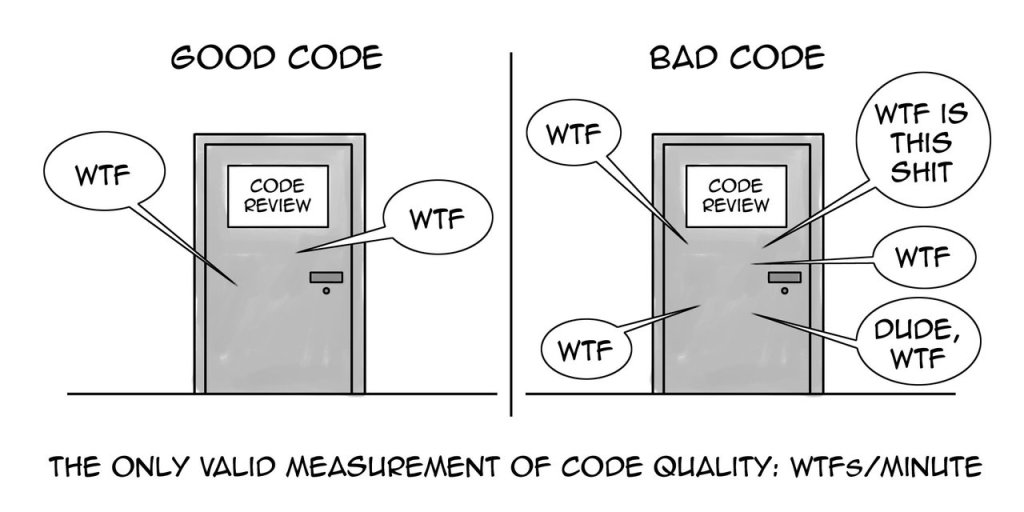
The first encounter I’ve ever had with any form of naming conventions was at a software engineering internship during the summer of my sophomore year at college. I remember going into my first code review naive and starry eyed ready to have my code applauded. However, the first thing I heard was “why are you naming your methods like that, you need to redo them all”. That was my first encounter with the WTF Test !
Clean Code By Robert Martin – WTF Test
tldr; The WTF test comes from the book Clean Code. It’s a way to determine your code quality by having a group of developers review your code, and count how many times they say WTF 😡.

The main source of this article and any following articles about clean code use Clean Code By Robert Cecil Martin as an important source. Robert Martin is one of the best recognized software engineers in history, one of our forefathers 🧙🏻♂️. He’s pioneered best practices in clean code, architecture, and agile development. I highly recommend reading his book, and am using it as the basis for my writings.
Now back to the WTF Test. There’s a process coined in the book Clean Code by which we can judge our code quality. The process starts like this. Get a group of developers together in a single room and have them review code together. You’re going to hear a “WTF is does this do” 🤨 in some form from each and every one of them. It’s in the blood of every developer to go “Well actually why didn’t you do it this way” ☝️, mine included. The amount of WTFs you get during a code review is how you judge whether you’ve got clean code on your hands.
Naming Conventions In Our Code
tldr; When naming anything in your code make sure it answers these three questions: Why does this code exist? What does it do? How is it used?
How we name variables, methods, functions, and classes in our code determines how readable, understandable, and clean our code is. The purpose of naming items is to convey meaning to others reading and reviewing our work. When choosing a name make sure that name answers these questions about what it’s representing in the code base:
- Why does this code exist?
- What does it do?
- How is it used?
Formatting Names
tldr; There are 4 formatting cases you can use in your code: camelCase, PascalCase, snake_case, and kebab-case.
When I’m talking about formatting, I’m talking about 4 cases used in naming variables, functions, methods, and classes. These cases are used when separating individual words within our blocks of code. The 4 cases are: camelCase, PascalCase, snake_case, and kebab-case. Each programming language uses at least one of these formatting styles, and we must stick with them regardless! You can have a variation where variables use one style like camelCase while classes use PascalCase, but that means every variable you make must be camelCase and every class must be PascalCase. No if ands or buts 😠. Now let me show you an example of the same variable in each of these styles:
camelCase 🐪
In camel case separation is done by lower-casing the first word, but each subsequent word will be capitalized (Kind of like the hump of a camel 🐪).
String firstName = "Mikhail";
Some languages that use camel case: Java, C#, C, JavaScript …
PascalCase
In pascal case separation is done by capitalizing each word. (yup you guessed it it’s shaped like a… well it’s not shaped like anything instead it’s named after the programming language Pascal)
String FirstName = "Mikhail";
Some languages that use pascal case: Java (For Classes), C# (For Classes) …
snake_case 🐍
In snake case separation is done by using an underscore( _ ). Every word is lowercase. (you might say it looks like a snake 🐍)
String first_name = "Mikhail";
Some languages that use snake case: Python
kebab-case 🤤
In kebab case separation is done by using a dash( – ). Every word is lowercase. (you’ve guessed it, it’s kebab shaped 🤤)
String first-name = "Mikhail";
Some languages that use kebab case: HTML
Naming Variables
tldr; Variable names should reflect the value the variable is store, so name them using a noun.
Variables are a store of values, and their names must reflect what they’re storing. You can think of them as a box, and our names are supposed to describe what’s in that box. To do that we use nouns in naming them.
For example, let’s say we have a website with users, and we need a variable to store an individual user. This is what our code can look like:
User user = new User();
A simple name like user is perfect for this occasion. Anyone looking at this code will instantly know what's in that variable.
Now let’s take a look at a bad example of the same implementation:
User u = new User();
You might look at that and still think “well that’s not that bad, I can still tell that’s a user”. The only reason that maybe readable is that the Object of our user still follows the clean coding principle. Let’s get rid of that in a language that doesn’t require types like JavaScript:
let u = {name: "Mike"}
Now it’s a lot harder to tell what u stands for. Single letter variable names should be avoided. They’re difficult to understand, difficult to search for, and difficult to reuse. However, there is an exception. Single letter variables are ok when working with loops:
for (int i = 0; i < 100; i++){
	System.out.println(i);
}
Even in these cases do not use the letters l or the letter O, since in some text editors and development environments they may look like the number 1 and the number 0.
Booleans
tldr; Boolean names should use a noun verb combination that allows for a binary answer.
Since booleans only hold a binary true/false value their names are slightly different from other variables. Booleans describe the state of something within our code, so we use a noun in combination with a verb to name our variable:
for (int i = 0; i < 100; i++){
	System.out.println(i);
}
Constants
tldr; A constant name should be fully upper case. A few languages do not follow that guide.
Constants are another exception to the rules above. The common practice with constants is for the entire word to be upper case with words being seperated by an underscore ( _ ):
static int final MAX_CUSTOMERS = 100;
This is the generally accepted practice however there are language specific exceptions, just like everything in coding 😔. Javascript is one of these. The const type in Javascript is a form of constant, but it is frequently used by developers since it provides scope and a form of type safety within Javascript. Though it is still a constant and the values within the variable cannot be changed, well kind of there are ways to get around this but I won’t go into it in this article. Naming constants in javascript follows the same pattern as any variable in JavaScript, camelCase:
const maxCustomers = 1000;
Naming Methods/Functions
tldr; Functions carry out a task, so their names should be a verb to show an action is being performed
Functions perform an action or carry out a task within our code so we use a verb when naming them. For example let’s say we want to code a method/function to upload a legal document:
public void uploadLegalDocument()
The formatting of methods/functions is language specific, but they also follow one of the 4 mentioned cases in the Formatting Names section.
Accessors, Mutators, and Predicates
tldr; Name with value being acted on prefixed with get, set, or is
Acessors, mutators, and predicates should be named for the value they’re acting on and prefixed with get, set, and is. For example:
public Document getDocument();
public void setDocument(Document document);
Naming Classes
tldr; Name as a noun that describes the object
Classes are representations of objects, so we should use nouns when making them that describe the object. For example:
public class Car {}
In Java and many other languages classes follow the PascalCase of formatting.
Clean Code Naming Principles
tldr; The following are coding guidelines that are standard for variables, functions, methods, and classes
The following sections apply to variables, methods, and classes. They are guidelines to follow to make your code readable, query-able, and easily maintainable. Making sure that we pass the WTF Test.
Avoid Misinformation
tldr; Don’t use names or terms that make false claims about what your code is doing
Avoid using names and terminology that leads developers astray. For example don’t name functions with actions they are not carrying out. A common example is when working with databases there can be a tendency to use the word update when really we are inserting into the database:
public void updateUser(User user){
  String query = "Insert into user (firstName, lastName) VALUES (?, ?)";
}
As you can see this would cause confusion to anyone using this method. They would expect the term update to mean an alteration to existing values, but really we are creating a new entry into the database
Another form of misinformation is using well established development terms that are in our developer lexicon to have different meanings. For example whenever a developer sees the abbreviation DB they think database. However in this example we can mislead developers with that term:
Double clickCountDB = 0.0;
In this example the the abbreviation DB does not stand for database, but instead stands for double. Most developers will still read this variable as clickCountDatabase on their first read leading to a big WTF 😳
In general I am not a fan of using 2 letter abbreviations in code because they can mean many things for many developers. I refrain from them unless they are very common ones such as DB.
Stay Consistent
tldr; When using a certain name to perform an action make sure to use that same name throughout your code
If you use a certain word in one point of the code to mean one thing, reuse it throughout. Here’s an example:
List<String> firstNames = new ArrayList<String>();
List<String> lastNames = new ArrayList<String>();

public void insertFirstName(String name){
  fistNames.add(name);
}

public void addLastName(String name){
  lastNames.add(name);
}
As you see these two methods do the same thing, they append values to an array list. However, one is prefixed with insert and the other with add. This would leave developers thinking what’s the difference? What does insert do that add doesn’t. So in cases like this, it is important to stay consistent
Make Names Searchable
tldr; Use names that are easy to ctrl/cmd + f for and easy to differentiate
Text editors and development environments have powerful search capabilities, so we should use names within our code to utilize them. To do that, use names that are easy to differentiate. Here’s an example of why we should:
String validatedUserNameWithCapital;
String validatedUserFirstNameWithCapital;
String validatedUserLastnameWithCapital;
String validatedUserNameWithoutCapital;
These names break a lot of the previous clean code principles, but on top of that they are hard to tell apart. When searching for these variables you might not be able to tell which one you are even looking at without looking at the code for a solid 2 minutes, and no one has time for that 😤.
Using single letters or numbers for variable names, also makes them hard to search for. How many millions of times do you use the letter i in your code. Now picture trying to find a variable named i. Exactly, so if I can’t grep your code I don’t want it.
Use Easy To Pronounce Words
tldr; Use names that are easy to pronounce…. kind of self explanatory 😆
When I was an intern I was consistently scared to ask questions. This was even more amplified when I COULDN’T PRONOUNCE THE WORDS! None of us want to seem dumb or ignorant at work, so when we run into a code block we can’t pronounce we’d be hesitant to speak up 😨. For example:
String sesquipedalian = tendancy to use long words;
There’s clearly an error in this code, but I sure as hell can’t pronounce sesquipedalian! This would definitely increase the difficulty for me to point out the error, let alone speak up.
Don’t Add Unnecessary Detail
tldr; Don’t use too much context in your code
Let’s say you’re declaring an integer or an array, you don’t need to append the type to the name:
int userCountInteger = 0;
User[] userArray;
Adding types to variables is an unnecessary detail. Anyone working with or in your code will be able to tell those in a quick glance, don’t muddy up your code with them.
Conclusion
Names play a large factor in coding. They help us understand code and maintain it. Writing clean code is not an easy task. It takes discipline, practice, and implementation. However, if we keep at it we’ll easily limit the amount of WTFs we get in our code reviews. That’s all we can really hope for 🥹.
 Basic Dev Blog
Leave a comment